B2B Proposal Software: PDF, Online Approval and Sales Speed
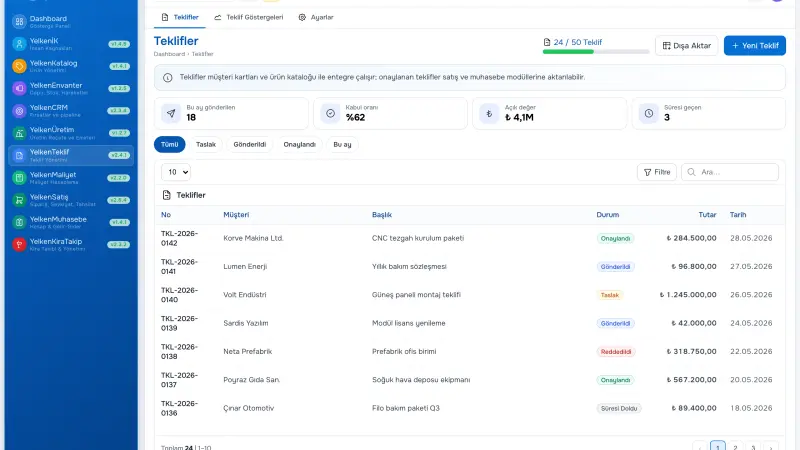
In B2B sales, proposal preparation requires current product price, discount authority, delivery terms, and customer approval on one record. Excel files and email attachments lose revisions, break customer links, and update stock reality late. This guide covers proposal preparation software, selection criteria at SME scale, and how the proposal module fits inside modular ERP.
Short answer: Proposal preparation software combines product catalog, pricing, PDF or online approval, and customer record in one flow. Sales teams use the same templates, revisions are tracked, and accepted quotes can convert to orders.
What is proposal preparation software?
Proposal preparation software is the application used to create, send, revise, and obtain customer approval for pre-sales price quotes. Core functions include line-level product and service selection, unit price, quantity, discount, tax, and total calculation. Advanced solutions add template management, multi-currency, delivery terms, and approval matrix.
SMEs often produce quotes in Word or Excel; that works at small volume but creates version chaos as teams grow. A central proposal preparation program prevents mixed PDF versions to the same customer. When a rep exceeds allowed discount band, the system can warn—important for margin protection.
Who needs it most?
- Distributors and wholesalers with dozens of active quotes
- Engineering and manufacturing firms with project pricing
- Field sales teams needing mobile access
- Operations managers speeding quote-to-order handoff
Core steps in the proposal process
A well-defined proposal preparation flow has stages: customer and opportunity selection, line entry, price and discount check, internal approval, customer send, follow-up, accept or reject. Each stage with system status avoids «where is the quote» email searches.
- Open quote from customer card or CRM opportunity
- Pick product and service lines from catalog
- Set discount and lead time within policy
- Send PDF or online link to customer
- Record revision and version history
- After acceptance, transfer to order or operations record
When these steps run on one platform via the Proposal module, data duplication drops. See the module page for full feature list.
Limits of Excel and email
Excel templates are flexible; formulas customize easily. But customer code, stock status, and credit limit stay in separate files. Example scenario: Sales added an out-of-stock line; customer approved; warehouse found shortage at shipment. That mismatch erodes trust. When the program shares database with stock and product cards, available quantity appears while adding lines.
Email PDF is common; but you cannot measure if the customer opened the quote, which revision they read, or when they will respond. Online approval links partly close that gap. Support both PDF and link in process design.
Features to look for
- Catalog integration: SKU, variant, unit price stay current
- Revision history: Differences between versions recorded
- PDF and brand: Corporate template, logo, terms
- Online approval: Customer accept or reject via link
- CRM link: Tie to opportunity and customer card
- Order transfer: Create sales order after acceptance
Discount and authority management
Floor margin and approver roles should be configurable. Reps should not silently override price without audit trail. Manager approval for exceptions inside the tool beats side-channel email.
Excel versus central proposal tool
| Criteria | Excel / email | Proposal software (ERP) |
|---|---|---|
| Revision trail | Manual file names | Automatic version and date |
| Customer record | Separate list | Single account card |
| Stock visibility | Lookup risk | Live connection |
| Online approval | Rare or manual | Link and status tracking |
| Multi-user | Conflicting files | Roles and locking |
| Order handoff | Re-entry | One-step conversion |
Rollout steps for SMEs
Phase one: standardize ten to twenty templates covering eighty percent of deals. Phase two: migrate active price lists and discount rules. Phase three: train revision discipline—every change is a new version. Phase four: connect acceptance to fulfillment.
Teams that skip template design recreate chaos in the new system. One workshop for mandatory fields: delivery terms, warranty, signatory. Short internal style guide keeps PDFs consistent.
Measuring success after go-live
- Median hours from draft to customer send
- Average revisions per won deal
- Share of quotes sent with online link
- Fulfillment errors from wrong quoted SKU or price
- Win rate when quote sent within internal SLA
Compare to your own history; example target: reduce revisions from five to three per won deal after catalog cleanup.
Aligning proposals with CRM and inventory
A quote is a pipeline stage, not an isolated document. When CRM software and proposal tools share one customer card, activities and quote versions appear on one timeline. Managers see opportunities without sent quotes and deals stalling after send.
Linking to inventory and warehouse software lets reps see quantity or lead time while building lines. Manufacturing SMEs extend with manufacturing solutions when BOM matters.
Online approval in B2B practice
Procurement often still archives PDFs; online page speeds yes or no. Best flow offers both. Timestamp on accept supports compliance. Reject with reason feeds CRM follow-up.
Example scenario: Customer accepted via link Tuesday 14:00; warehouse saw order same day; shipment Wednesday—no re-entry from email attachment.
Modular ERP positioning
Yelken360 lets you start with Yelken Proposal and add stock, CRM, or accounting when ready. Quotes, customers, and limits stay scoped per workspace—useful for separate brands or branches.
Related guides: Yelken360 modular ERP, inventory guide, rental module guide.
Compare packages on pricing or request walkthrough via contact.
Frequently asked questions
Is proposal software the same as CPQ?
CPQ implies complex product rules and bundling. Many SMEs need practical quoting: catalog lines, discounts, PDF, approval. Full CPQ may be overkill until option matrices explode.
PDF if we have online approval?
Yes for many B2B buyers. Best flow offers both.
Implementation time?
With price lists and two to three templates, often two to four weeks. Complex BOM quoting needs phasing.
Integrate with current CRM?
Define which system owns opportunity stage. Native modular ERP keeps opportunity, quote, and order on one card.
What ROI to measure?
Quote cycle time, revision count, win rate after online send, fulfillment errors from wrong SKU or price. Tie to margin protected.
Legal terms and validity on quotes
Standard terms (payment days, validity date, incoterms for export) belong in template footers, not retyped per deal. Validity expiry should trigger CRM task for follow-up before automatic stale quotes clutter pipeline reports. Legal review once per year on template text beats per-deal ad hoc edits in email.
Multi-currency display for export customers
Export B2B may need quote in customer currency with internal base currency for margin check. Define whether exchange rate is snapshot at send or at acceptance; document the rule so finance and sales do not argue at month-end. Proposal module configuration should match that policy consistently.
Rental and project quote variants
Some lines are rental (time-based) rather than sale; link to rental module convert flow after acceptance. Project quotes with milestone billing need clear handoff notes when order module is not yet live—avoid accepting in proposal with no operational next step defined.
Security and quote data sensitivity
Quotes contain price, margin, and customer strategy. Role permissions should limit export of full price lists to sales roles that need them; audit log on discount overrides supports internal control. Online approval links must expire and use unguessable tokens; customer-facing pages show only intended revision, not internal cost columns.
Template library governance
Limit who can publish new PDF templates. Sales may draft line content; only admin or sales ops publishes template changes affecting terms and tax wording. Version templates in release notes internally so reps know when payment terms footer changed. Reduces «customer signed old terms» disputes.
Handoff checklist after customer acceptance
- Verify stock or lead time on every line if inventory module is on
- Convert to sales order or rental per line type
- Notify warehouse or yard with order reference, not email PDF only
- Close or advance CRM opportunity stage same day
- Archive sent PDF revision ID on customer card notes
Can we quote before CRM is live?
Yes if customer master exists in proposal module. CRM adds pipeline stages and activity timeline; start with customer cards and add CRM when opportunity tracking becomes the bottleneck.
Run a monthly «stale quote» report: sent but not accepted past validity, no CRM activity in fourteen days. Sales managers use it for coaching, not blame; stale pipeline hides forecast error.
Should inside sales and field sales share one template set?
Yes for margin and brand consistency; segment optional line blocks by team if needed, not separate undocumented Excel files per rep.
Review validity settings each quarter against won-deal duration data from your own CRM export, not industry benchmarks you cannot verify.
Summary
B2B proposal preparation software with PDF and online approval speeds sales and protects margin. Explore Yelken Proposal, modules, and pricing; demo via contact.